
SAINOTIC / VECTRA KICK
Build it fast. Control every last detail.
VECTRA KICK is a focused kick synthesizer for the point where speed and precision have to coexist. Shape the big decisions immediately, then go straight into the pitch, amplitude and phase behavior underneath.
Standalone instrument · macOS + Windows
REAL WORKFLOW / KICK + BASS
Hear it where it actually matters.
A kick can sound impressive alone and still fail the moment the bass arrives. This demo puts VECTRA KICK where it belongs: inside a real Cubase kick-and-bass workflow.
WHY VECTRA KICK
Simplicity where you need it. Depth where you want it.
You should not have to live inside a curve editor every time you want a different kick. And you should not be trapped behind a few macro controls when the last 5% actually matters. VECTRA KICK gives you both paths on the same kick.
Make the big decisions in seconds.
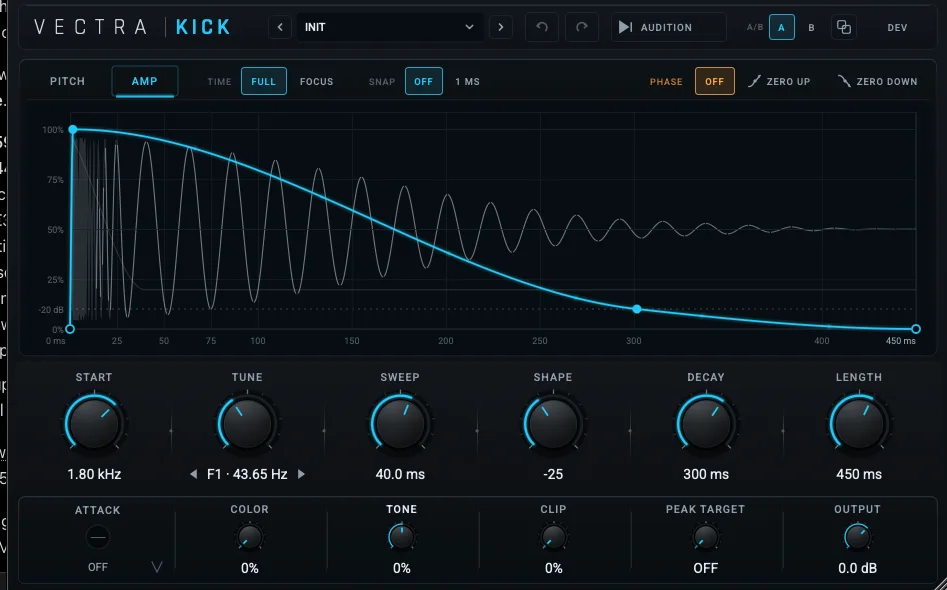
START, TUNE, SWEEP, SHAPE, DECAY and LENGTH cover the structural decisions you reach for constantly while producing.
Open the structure when the details matter.
Edit the underlying pitch and amplitude trajectories directly. Move nodes, reshape segments, adjust tension and solve the exact part that is wrong.
FAST SHAPING / IMMEDIATE
Start with the controls that actually matter.
Get the weight, pitch movement, body and timing into the right place without interrupting the writing process. The main controls are the fast path, not a simplified second engine.
PHASE ANCHOR / CONTROL THE HANDOFF
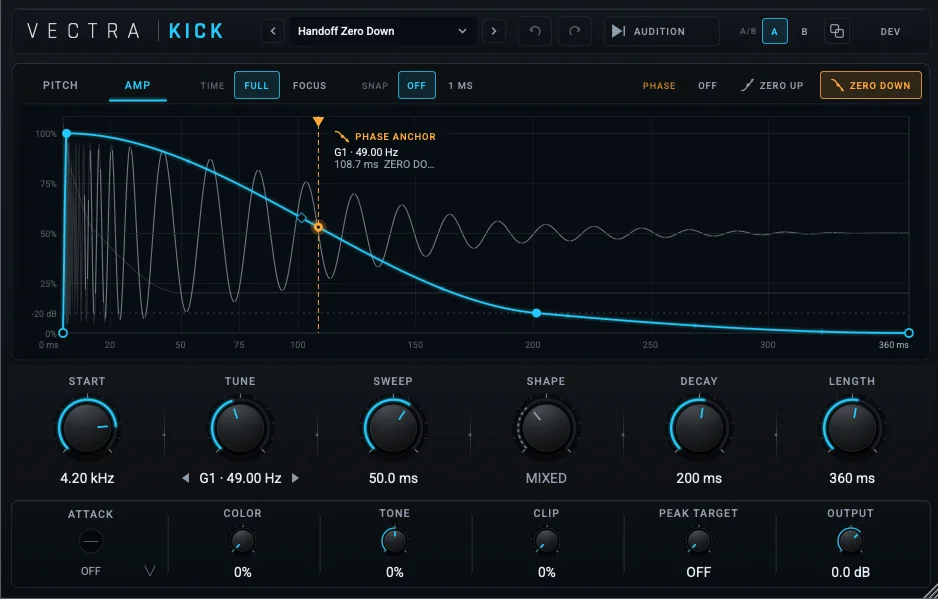
Choose where the body crosses zero.
Phase Anchor gives you deliberate zero-crossing control with ZERO UP and ZERO DOWN. Instead of treating phase as something you discover after the kick is already fighting the bassline, you can make it part of the design process.
ATTACK / ONLY WHAT YOU NEED
Build the transient without building a workstation.
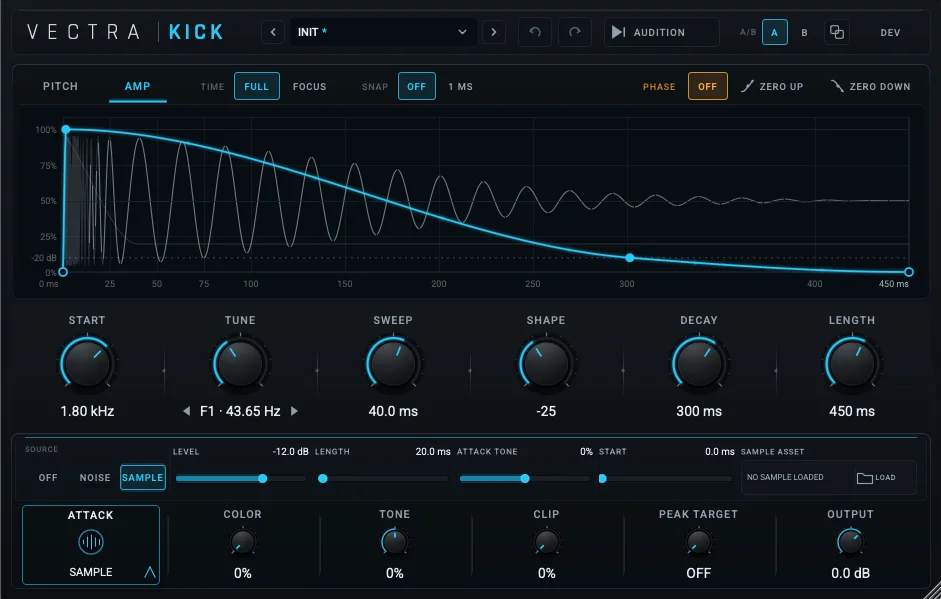
Run the synthesized body alone, add deterministic noise, or load a sample transient. Then shape LEVEL, LENGTH, TONE and START without burying the instrument under a generic layering system.
WHY IT FEELS DIFFERENT
The controls do not hide the kick from you.
The macro layer and the direct editor are two views of the same underlying instrument. Move quickly when you can. Open the structure when you cannot. You never have to rebuild the sound in another workflow just to make one precise correction.
Alignment without a mid-hit phase reset.
Phase Anchor adjusts the kick so the synthesized body reaches the selected zero crossing at the chosen time. It does not hard-reset the oscillator in the middle of the hit.
That keeps the trajectory coherent while giving you a concrete way to shape the transition into the bass.
COMPLETE WORKFLOW
Finish the kick without leaving the instrument.
VECTRA KICK stays focused, but the workflow is complete: shape, refine, compare, automate and render the finished hit directly into the project.
Direct Curves
Edit pitch and amplitude trajectories directly, with per-segment tension when the contour needs more precision.
Focused Finishing
COLOR, TONE, CLIP, PEAK TARGET and OUTPUT cover the finishing decisions that belong inside the kick instrument.
Musical GRID
Work with 1/64, 1/32, 1/16, 1/8 and 1/4 timing against the host tempo when musical time makes more sense than milliseconds.
DAW Automation
Automate the core public control surface in the host and keep the instrument integrated with the session instead of frozen outside it.
A/B Comparison
Keep two complete kick states available for direct comparison without losing the sound you started from.
Presets
Recall complete kick states and build your own reusable starting points without breaking the direct-edit workflow.
Exact WAV Render
Render the current kick as a 32-bit float WAV using the same instrument state you are hearing.
Drag It Out
When the kick is finished, drag the rendered WAV straight into your DAW arrangement. No separate bounce ritual.
FOCUSED BY DESIGN
A kick instrument, not a generic production suite.
What belongs here stays here.
Body shaping, direct curves, Phase Anchor, attack design, focused finishing, grid timing, automation and exact export all serve one job: getting the kick right.
No feature-count theatre.
VECTRA KICK is intentionally not built around workstation-style layering, a giant FX rack or a pile of unrelated processing. The depth is where the kick actually needs depth.
VECTRA KICK / SAINOTIC
Build the kick. Solve the details. Drop it into the track.
A fast front end when you are writing. Direct structural control when the last few percent matter. One focused instrument from first idea to rendered WAV.
For macOS and Windows. VECTRA KICK is a separate instrument and does not require VECTRA.
Get VECTRA KICKFAQ
The practical details.
Is VECTRA KICK a separate plug-in?
Yes. VECTRA KICK is a standalone instrument. You do not need VECTRA to use it.
Can I drag the finished kick into my DAW?
Yes. VECTRA KICK can render the current kick as a 32-bit float WAV and drag it directly into your project. An explicit save path is also available.
What does Phase Anchor do?
Phase Anchor lets you choose a zero-crossing target for the synthesized body using ZERO UP or ZERO DOWN. It adjusts the kick so the body reaches that crossing at the chosen time without hard-resetting phase in the middle of the hit.
Can I use my own attack sample?
Yes. ATTACK supports OFF, synthesized NOISE and SAMPLE modes, with dedicated controls for level, length, tone and start position.
Does VECTRA KICK support host automation?
Yes. The core performance and sound-shaping controls are exposed to the DAW for automation.
Is VECTRA KICK only for psytrance?
No. The kick/bass handoff is especially important in styles such as psytrance and techno, but VECTRA KICK is a general-purpose synthesized kick instrument for electronic production.
VECTRA KICK
Simplicity where you need it. Depth where you want it.
Six immediate controls when the idea is moving. Direct pitch, amplitude and phase control when the details matter. Exact WAV drag-out when the kick is done.