Audionerdz / Vectra Documentation
Vectra Prism Core
Advanced Wave Core, Warp, Mutate and DNA Flux
A professional operating manual for VECTRA's Prism Core system: live Warp transformation, generative Mutate workflows, DNA Flux blending, Advanced Wave Core behavior, expanded mutate controls, modulation rules and practical oscillator-shaping recipes.
1. Overview
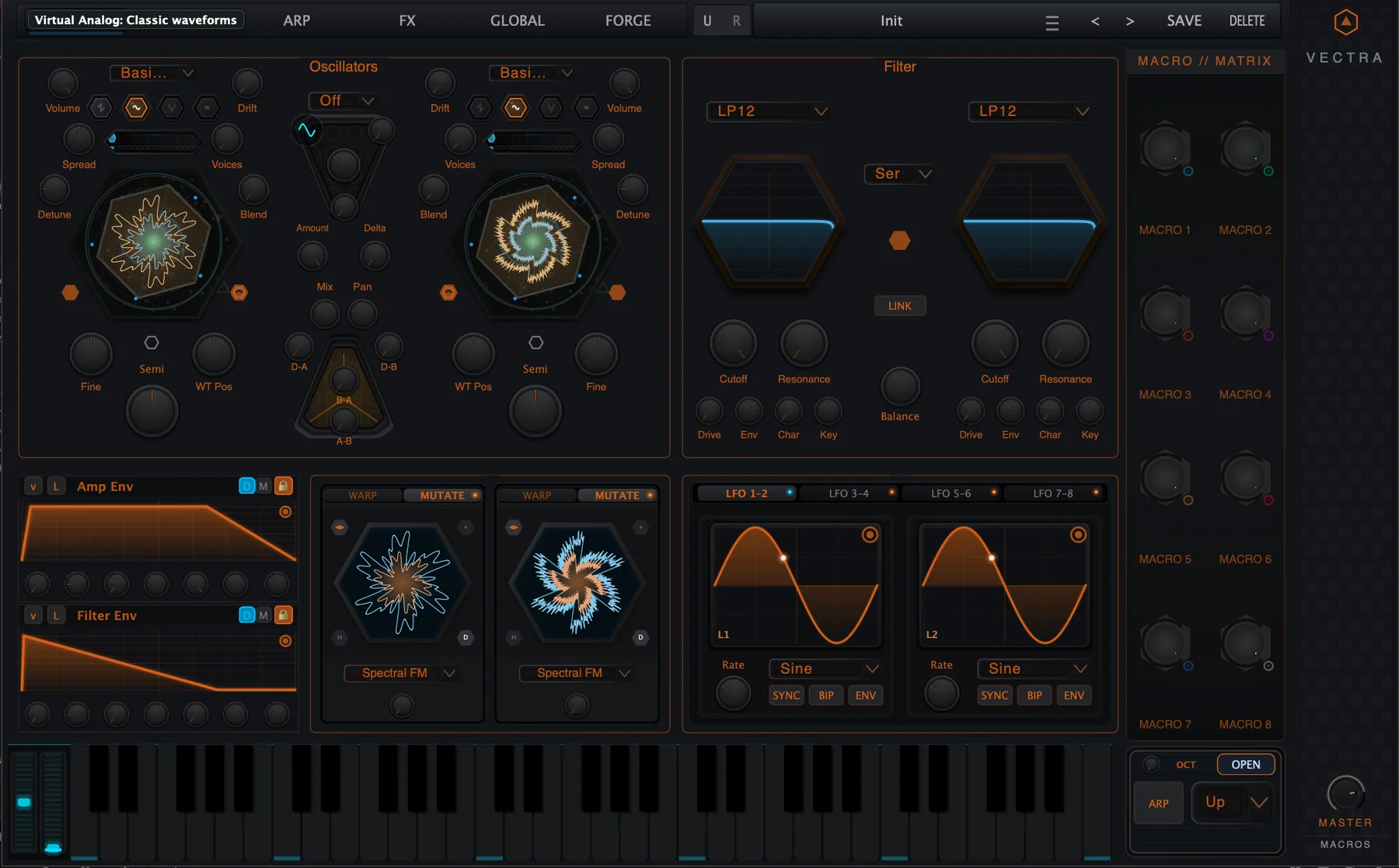
Prism Core is Vectra's advanced oscillator transformation system. It lives directly on the Synth page below each oscillator and gives every oscillator a compact creative engine for live shaping, offline mutation and evolving generated tone.
The system has three core actions: Warp, Mutate and DNA Flux. Warp changes the active oscillator in a continuous, playable way. Mutate generates a new wavetable variation from the current oscillator DNA. DNA Flux generates an alternate mutation layer and lets the live oscillator blend into it with a dedicated amount control.
| Area | What it means |
|---|---|
| Prism Core | The Synth-page UI component below each oscillator. It hosts Warp, Mutate, DNA Flux, audition and reforge controls. |
| AWC - Advanced Wave Core | The DSP/generative engine behind Prism Core. AWC performs the waveform transformation and mutation work. |
| Expanded Mutate Panel | A larger mutate-only workspace reached from the oscillator core. It focuses on Mutate and DNA Flux, not Warp. |
| Warp | A live shaping stage with positive/negative amount and selectable warp modes. |
| Mutate | An offline/rebake process that writes a generated wavetable variation. |
| DNA Flux | A live alternate mutation layer with a modulatable amount control. |
2. Quick Start
2.1 Add live shape with Warp
- Open the Synth page and locate the Prism Core panel below the oscillator you want to shape.
- Click the WARP tab if the panel is currently on MUTATE.
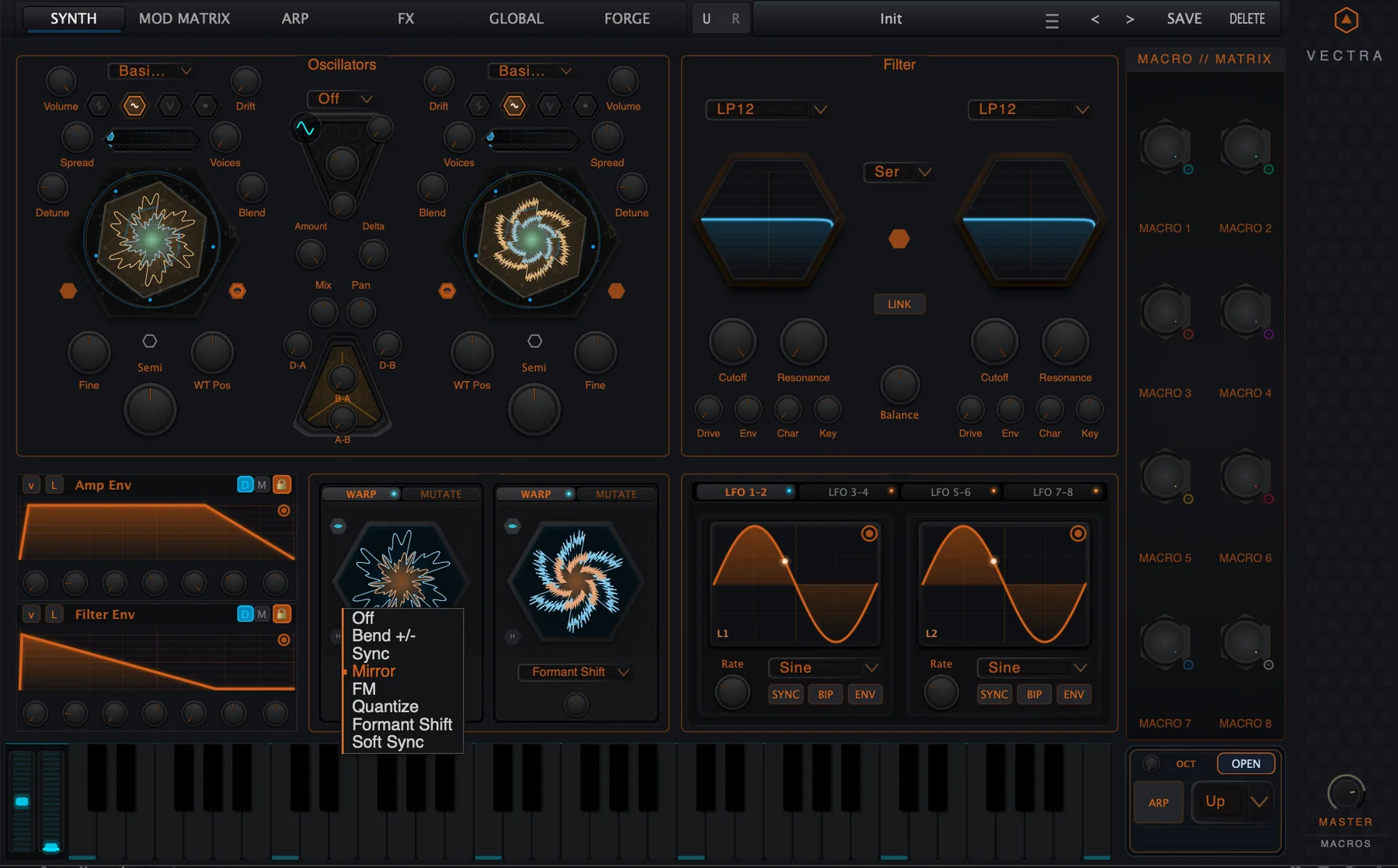
- Choose a Warp mode such as Bend +/-, Sync, Mirror, FM, Quantize, Formant Shift or Soft Sync.
- Raise or lower the Warp amount. Negative and positive values can produce different motion.
- Use Living Matrix modulation on Warp Amount for expressive movement.
2.2 Generate a new oscillator variation with Mutate
- Switch the Prism Core panel to MUTATE.
- Choose a mutation algorithm such as Wavefold, Spectral Resonator, Spectral FM, Genesis Recomb, Spectral Lattice or Harmonic Manifold.
- Set Amount and the secondary Density, Decay and Gain controls where visible.
- Press Reforge or MUTATE to create a new variation.
- Enable AUTO when you want the current mutation to be re-applied as you edit the mutation controls.
2.3 Use DNA Flux
- Switch to MUTATE.
- Enable DNA.
- Choose the mutation algorithm used for the Flux layer.
- Adjust DNA Flux Amount. This blends the live oscillator toward the generated Flux layer.
- Modulate DNA Flux Amount from a Macro, LFO or envelope for evolving motion.
3. System Concept: Prism Core and AWC
Prism Core is the playable front end. AWC is the engine. In practical terms, you use Prism Core to decide whether you want real-time transformation, a newly generated wavetable, or a live blend into an alternate generated version.
| Function | Best for | What changes |
|---|---|---|
| Warp | Performance movement, timbral push, animated oscillator tone. | The live oscillator output is continuously shaped by a warp mode and amount. |
| Mutate | Creating new source material from a wavetable or Forge-derived oscillator. | A new mutated wavetable is generated and becomes the oscillator source. |
| DNA Flux | Morphing into a generated variation while the patch plays. | A separate generated Flux layer is prepared and blended by DNA Flux Amount. |
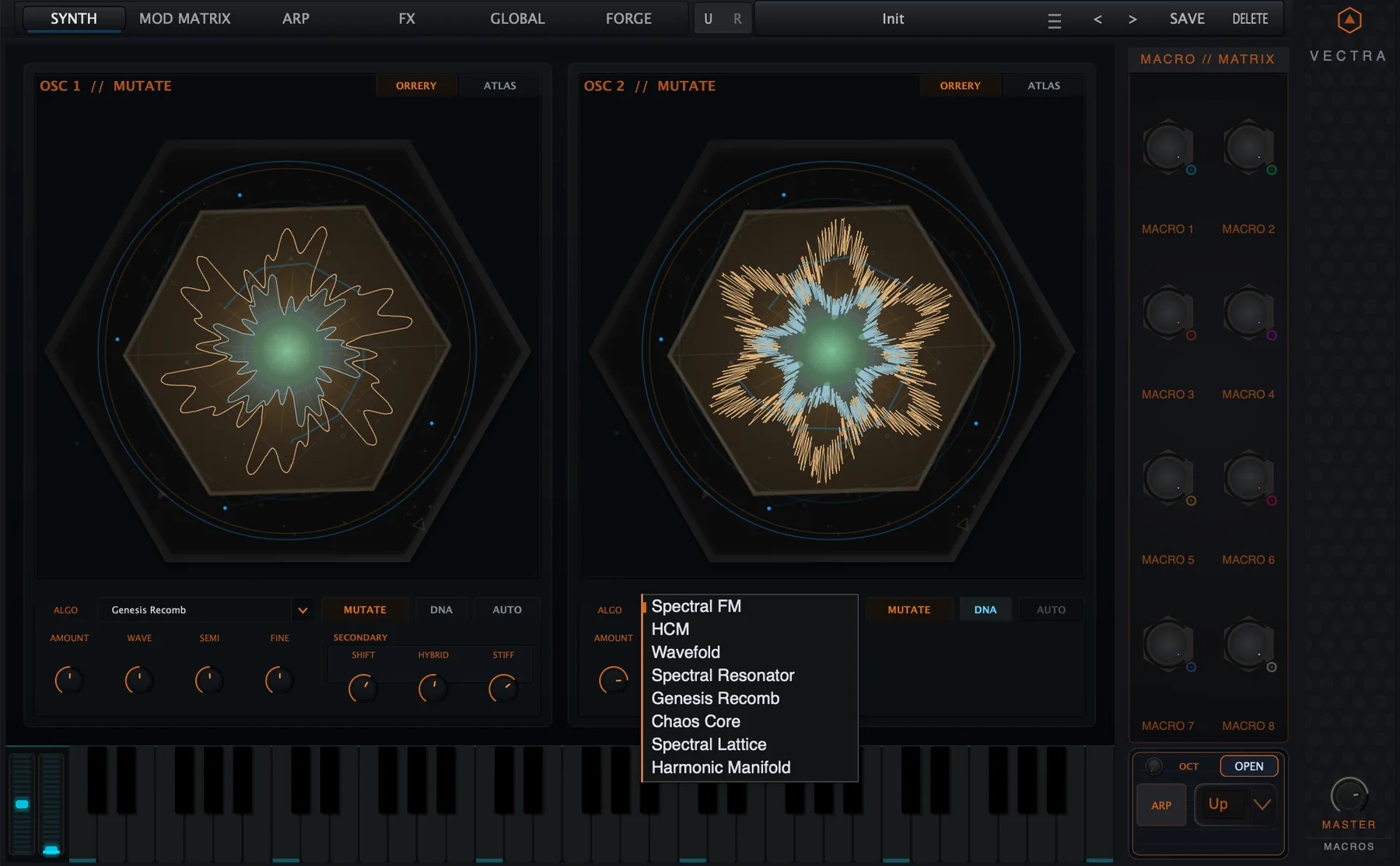
| Expanded Mutate Panel | Detailed two-oscillator mutation work and comparison. | Both oscillator mutation lanes are shown at large scale with Orrery/Atlas views. |
Musically, the system lets you move between three different kinds of change: performance, generation and evolution. Warp is immediate. Mutate is a commit. DNA Flux is an evolving bridge between the original and a generated alternative.
Back to top4. Interface Tour
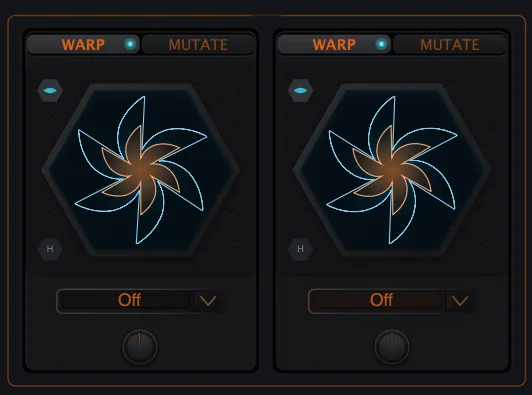
4.1 Prism Core panel
| Element | Use |
|---|---|
| WARP / MUTATE tabs | Switch the Prism Core face between live Warp controls and mutation controls. |
| Main hex display | Visual feedback for the current oscillator DNA, generated shape and audition state. |
| Mode selector | Chooses the Warp or Mutate algorithm for the current face. |
| Amount knob | Controls Warp Amount, Mutate Amount, or DNA Flux Amount depending on view. |
| Audition button | Previews the transformation state without committing it as the final source. |
| Reforge / Mutate button | Generates a new mutation or variation. |
| DNA button | Switches the Mutate face into DNA Flux live mutation mode. |
| AUTO pill | Re-applies the current mutation when relevant controls change. Hidden or inactive while DNA Flux is active. |
| HQ button | AWC quality switch for wavetable interpolation quality: Linear/Normal or Cubic/High. |
5. Warp
Warp is the live side of Prism Core. It is designed for immediate oscillator shaping: bend the source, impose sync-like motion, introduce mirror or quantized movement, or push the oscillator into FM/formant-style behavior. Warp is a performance control and is therefore suitable for modulation.
| Warp mode | Use it for |
|---|---|
| Off | No additional Warp shaping. |
| Bend +/- | Smooth positive or negative waveform bending. Useful for animated harmonic pressure. |
| Sync | Sync-like tightening and sweep behavior. Good for leads and aggressive bass. |
| Mirror | Fold or mirror-like symmetry changes. Good for metallic or glassy tone. |
| FM | Frequency-modulation-style edge and sidebands. Use small amounts first. |
| Quantize | Stepped or digital re-shaping. Good for hard electronic motion. |
| Formant Shift | Vocal-like spectral relocation. Useful for vowel and formant gestures. |
| Soft Sync | A smoother sync family with less hard edge than direct sync-style motion. |
6. Mutate
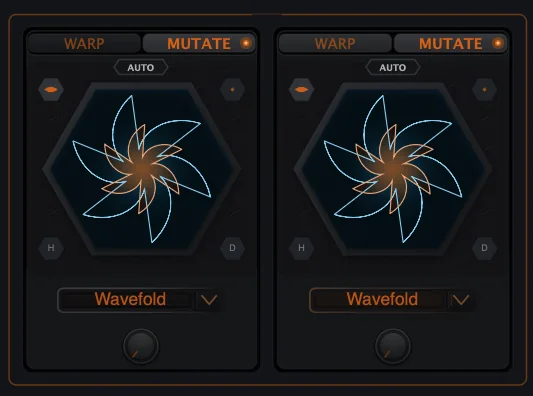
Mutate is the generative side of Prism Core. Instead of continuously bending the output, it uses the current oscillator material as a blueprint and generates a new wavetable variation. This makes Mutate ideal for sound discovery, Forge continuation, wavetable recombination and fast creation of unique oscillator DNA.
| Mutate mode | Character |
|---|---|
| Spectral FM | Spectral sideband generation and complex harmonic motion. |
| HCM | Harmonic Content Morphing: reshapes the harmonic balance and contour. |
| Wavefold | Folded harmonic generation and dense edge. |
| Spectral Resonator | Modal or resonant spectral shaping; a useful starting point for tonal mutation. |
| Genesis Recomb | Recombines source information into a new related table. |
| Chaos Core | High-variation generative mutation for unstable or aggressive material. |
| Spectral Lattice | Structured spectral recombination with lattice-like harmonic organization. |
| Harmonic Manifold | Complex harmonic topology and smooth high-detail reshaping. |
6.1 Amount and secondary controls
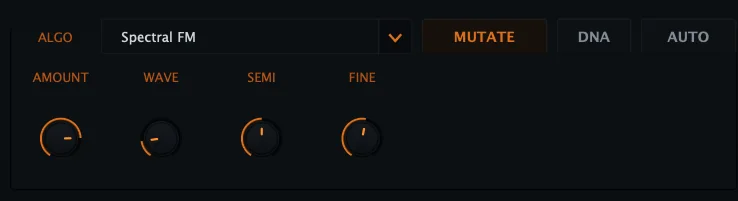
Mutate Amount sets how strongly the generator moves away from the current source. The secondary controls are Density, Decay and Gain. Depending on the algorithm and view, these may appear as DENS, DECAY, GAIN, or related secondary labels such as TILT and FOCUS.
| Control | Range | Meaning |
|---|---|---|
| Amount | 0.0 - 1.0 | Mutation intensity. Higher values usually produce a more distant generated result. |
| Density | 0.5 - 2.0 | How dense the modal/spectral structure becomes. |
| Decay | 0.5 - 2.0 | How modal or resonant energy decays through the generated result. |
| Gain | 0.5 - 2.0 | Output/generation gain conditioning for the mutated result. |
| Wave / WT position | 0.0 - 1.0 | Which area of the source wavetable is emphasized in the expanded panel. |
| Semi / Fine | -48..+48 / -100..+100 | Pitch context controls available from the expanded panel. |
7. DNA Flux
DNA Flux is the live mutation layer. It asks AWC to create an alternate generated wavetable for the oscillator, then exposes a live amount control so the patch can blend from the current source toward the Flux layer during performance.
| Behavior | Explanation |
|---|---|
| DNA toggle | Enables or disables the live DNA Flux layer for the selected oscillator. |
| DNA Flux Amount | Live blend amount toward the generated Flux layer. This is a modulation destination. |
| Flux algorithm | Uses the Mutate algorithm list to decide how the Flux layer is generated. |
| Density / Decay / Gain | Shape the generated Flux layer before it is blended. |
| Reforge interaction | When DNA Flux is active, disable DNA Flux before using Reforge to replace the underlying wavetable. |
| Auto interaction | Offline Mutate/AUTO behavior is dormant while DNA Flux is active. |
8. Expanded Mutate Panel
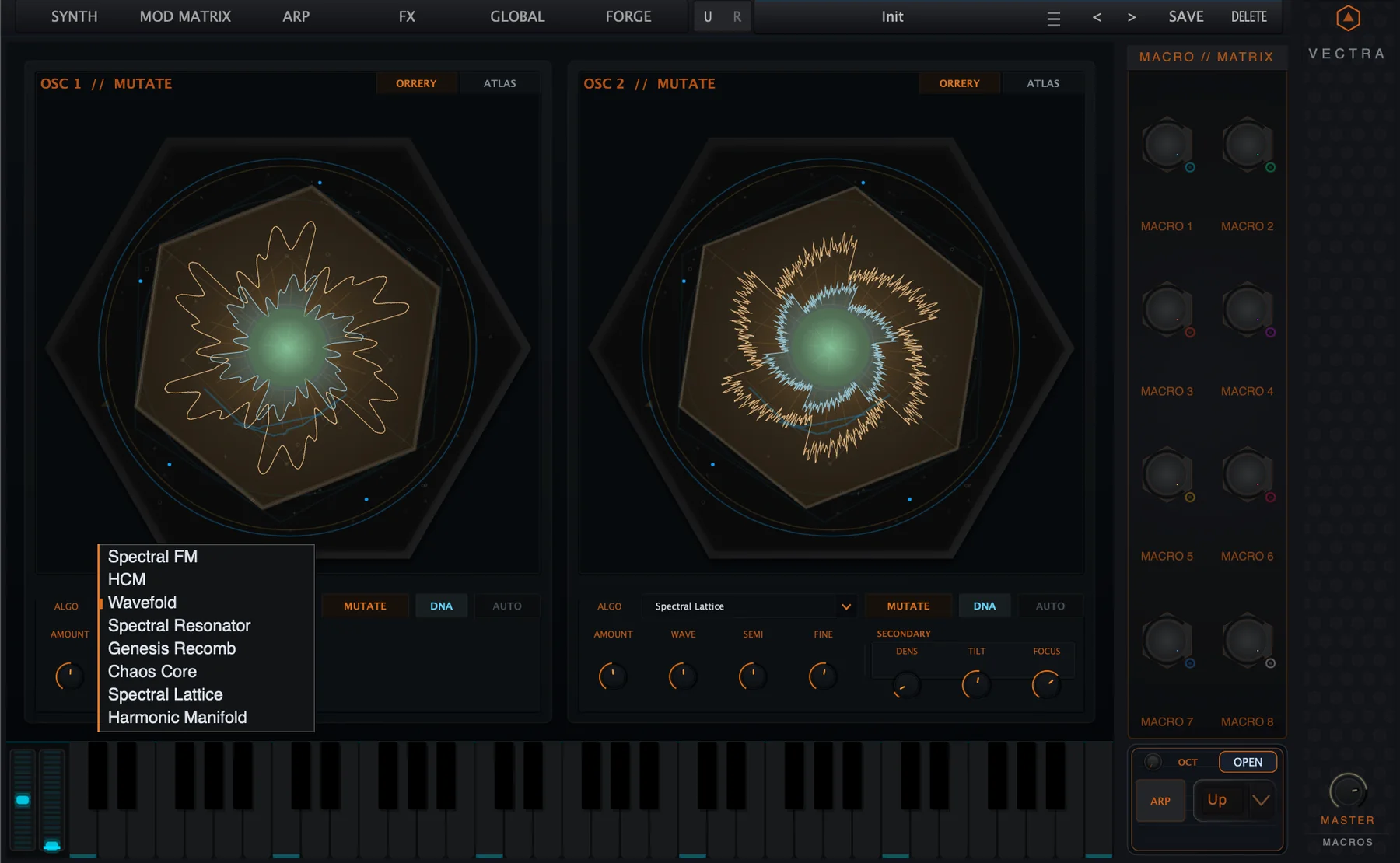
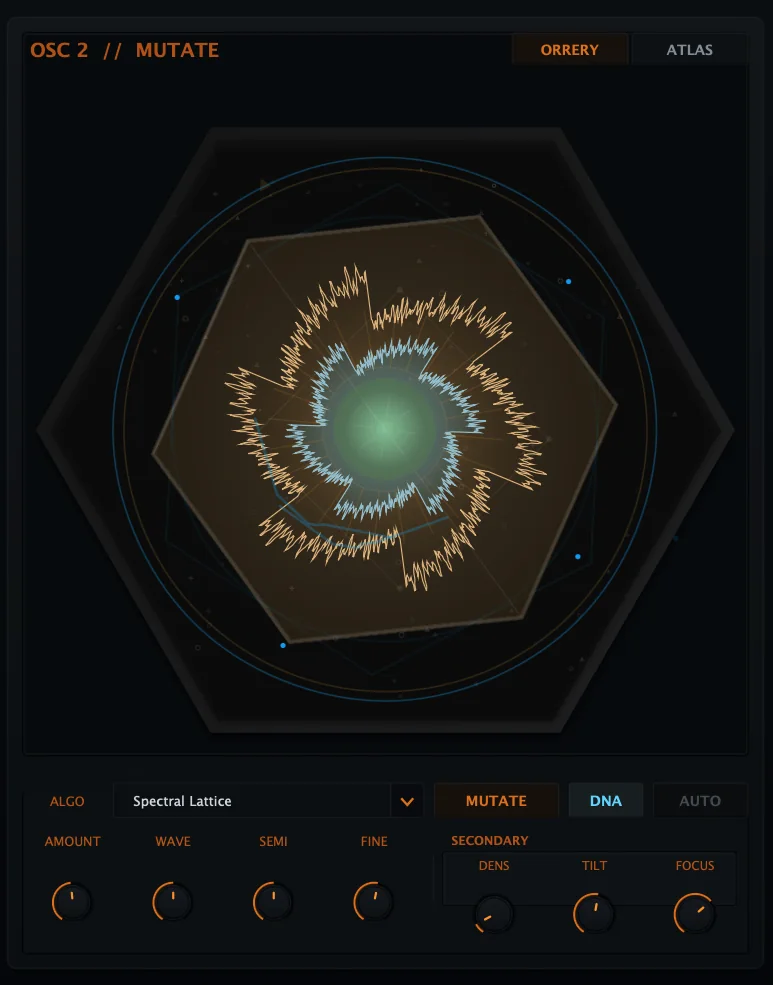
The Expanded Mutate Panel is the larger two-oscillator mutation workspace. Users open it by double-clicking the oscillator core, not by double-clicking the small Prism Core panel. It focuses on Mutate and DNA Flux and does not include Warp.
8.1 Lane controls
| Control | Meaning |
|---|---|
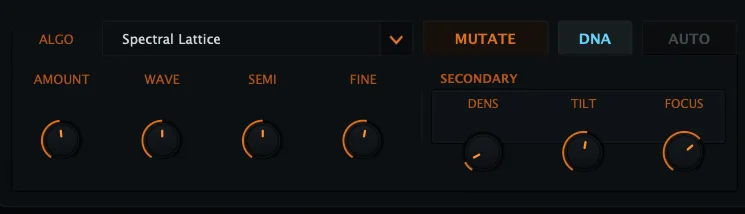
| ORRERY / ATLAS | Switches the large oscillator visualization between Orrery and Atlas-style views. Alt-click on ATLAS can toggle the isometric camera when available. |
| ALGO | Mutate/DNA algorithm selector. Same mutate families as the Prism Core Mutate face. |
| MUTATE | Applies a new mutation variation to the oscillator. |
| DNA | Toggles live DNA Flux mode for the oscillator. |
| AUTO | Re-applies the current mutation when mutation controls change. Disabled while DNA is active. |
| AMOUNT | Mutation intensity or Flux amount, depending on mode. |
| WAVE | Wavetable position/source focus for the expanded lane. |
| SEMI / FINE | Pitch context controls for the selected oscillator lane. |
| SECONDARY | Algorithm-specific Density, Decay, Gain or related secondary parameters. |
9. Forge and Wavetable Workflows
Prism Core is strongest when it is used with wavetable-family material. Normal wavetables, Forge-generated wavetables and previously mutated material can all become the source for new AWC transformations.
| Source type | Recommended workflow |
|---|---|
| Factory or user wavetable | Use Warp for live scan movement, then Mutate to create a new related table. |
| Forge oscillator material | Generate in Forge, load it into the oscillator, then use Mutate or DNA Flux to extend it as playable source material. |
| Already-mutated wavetable | Use Reforge to create another variation, or DNA Flux to add live movement without replacing the underlying source. |
| VA or sample context | Some Prism behaviors may be reduced or translated through the oscillator/wavetable path. Use wavetable or Forge sources for the fullest Prism Core workflow. |
10. Modulation Rules
Prism Core touches both live parameters and generation parameters. The distinction matters. Live parameters are designed for performance modulation. Generation parameters affect what gets generated the next time a mutation or rebake happens.
| Parameter / action | Modulatable? | Reason |
|---|---|---|
| Warp Amount | Yes | Live performance amount. |
| DNA Flux Amount | Yes | Live blend into the generated Flux layer. |
| Mutate Amount | No live destination | Generation/rebake intensity; not a continuous performance mix. |
| Density / Decay / Gain | No live destination | Generation/rebake controls for Mutate or DNA layer creation. |
| Warp mode selector | No | Chooses algorithm state. |
| Mutate algorithm selector | No | Chooses generation algorithm. |
| DNA toggle | No | Switches a mode/state. |
| Reforge / Mutate button | No | Triggers generation. |
| AUTO | No | Latch state for automatic rebake behavior. |
11. Practical Recipes
Warm wavetable drift
- Load a smooth wavetable.
- Set Warp to Bend +/- with a small amount.
- Route a slow LFO or Macro to Warp Amount.
- Keep Mutate off until the live movement feels right.
Metallic FM edge
- Choose a bright wavetable.
- Set Warp to FM.
- Start with very small positive or negative Warp Amount.
- Control brightness with the filter and map Macro 1 to Warp Amount.
Generated bass variation
- Switch to Mutate.
- Choose Wavefold or Spectral Resonator.
- Set Amount around the lower-middle range.
- Press Mutate/Reforge until the low end remains stable.
- Save the preset once the generated source works in context.
DNA Flux performance macro
- Enable DNA Flux on the oscillator.
- Choose Spectral FM, Genesis Recomb or Spectral Lattice.
- Set DNA Flux Amount low.
- Map Macro 1 to DNA Flux Amount.
- Use the macro as a movement or drop control in performance.
Forge continuation
- Create or load a Forge recipe.
- Send it to the oscillator.
- Use Mutate to create sibling variations.
- Use DNA Flux for live morphing between the source and a generated layer.
Two-oscillator mutation comparison
- Open the Expanded Mutate Panel.
- Use OSC 1 and OSC 2 with different algorithms.
- Switch between Orrery and Atlas views.
- Use Wave/Semi/Fine to compare musical roles.
- Blend the oscillators on the Synth page.
12. Troubleshooting
| Symptom | Likely reason | What to do |
|---|---|---|
| The expanded panel has no Warp controls. | The Expanded Mutate Panel is mutate-only. | Use the Synth-page Prism Core panel for Warp. |
| MUTATE changes the source instead of moving like a knob. | Mutate is a generation/rebake action. | Use Warp Amount or DNA Flux Amount for live modulation. |
| AUTO is grey or dormant. | AUTO is only relevant to offline mutation and is dormant while DNA Flux is active. | Disable DNA Flux if you want automatic rebake behavior. |
| Reforge does not replace the table while DNA is active. | DNA Flux is live-layer mode. | Disable DNA Flux before Reforge if you want to replace the underlying source. |
| A mode has a lock icon. | Some AWC modes require the relevant edition or module entitlement. | Use an unlocked algorithm or activate the required module. |
| The sound changes too aggressively. | High Warp/FM/Mutation amounts can create dense spectra quickly. | Reduce Amount, use lower Density/Gain, and filter after the oscillator. |
| The visualizer changes but the patch feels static. | The generated table may be committed, but no live amount is moving. | Modulate Warp Amount or DNA Flux Amount, or move WT Position. |
| Mutate Amount does not appear in the Mod Matrix. | It is a generation control, not a live destination. | Use DNA Flux Amount if you need live modulation into mutation. |
13. Technical Appendix
AWC operates on oscillator source material as a wavetable-oriented transformation system. It can either process live oscillator output through Warp, or generate/rebake a new wavetable set through Mutate and DNA Flux workflows. The implementation includes guardrails for non-finite samples, DC removal, RMS/peak conditioning and source-aware generation paths so generated material remains usable as oscillator input.
| System | Technical summary |
|---|---|
| Warp path | Uses a selected warp mode and bipolar amount. Warp Amount ranges from -1.0 to +1.0 and is exposed as a live modulation target. |
| Mutate path | Uses a source wavetable, selected mutator algorithm, Amount and secondary settings to generate a new WavetableSet. |
| DNA Flux path | Generates a separate Flux WavetableSet in the background. The generated layer is baked at full internal strength; the audible blend is controlled by DNA Flux Amount. |
| Seed behavior | Mutations use stored or generated seed data so reapplication and variation can be managed without silently breaking presets. |
| Forge source behavior | When the oscillator is in Forge mode, mutation paths can use the active Forge wavetable material as the source. |
| Entitlement behavior | Premium Warp and Mutate modes check the relevant capability and show lock/callout behavior when unavailable. |
13.1 Preset compatibility
Prism Core stores its visible aspect and DNA Flux view state with the preset so patches can reopen on the correct Warp/Mutate face. Mutated source data and seed/source references are also maintained so patches remain understandable even when the oscillator source changes.
13.2 Safety and level notes
AWC mutation can create very dense or bright spectra. Use the filter, output levels, Aegis Dynamics or other safety processing when exploring high amounts, FM-style warp, Chaos Core or strong resonance/lattice settings.
Back to top14. Parameter and Mode Reference
| Parameter | Range / choices | Default / note |
|---|---|---|
| Warp Mode | Off, Bend +/-, Sync, Mirror, FM, Quantize, Formant Shift, Soft Sync | Default Off. |
| Warp Amount | -1.0 to +1.0 | Default 0.0. Live modulation destination. |
| Mutate Mode | Spectral FM, HCM, Wavefold, Spectral Resonator, Genesis Recomb, Chaos Core, Spectral Lattice, Harmonic Manifold | Default Wavefold. |
| Mutate Amount | 0.0 to 1.0 | Default 0.0. Generation/rebake intensity. |
| SMF Density | 0.5 to 2.0 | Default 1.4 for standard mutation, 1.0 for DNA Flux layer. |
| SMF Decay | 0.5 to 2.0 | Default 1.3 for standard mutation, 1.0 for DNA Flux layer. |
| SMF Gain | 0.5 to 2.0 | Default 1.5 for standard mutation, 1.0 for DNA Flux layer. |
| DNA Flux Enable | Off / On | Default Off. |
| DNA Flux Amount | 0.0 to 1.0 | Default 0.0. Live modulation destination. |
| AWC Quality | Linear / Cubic | Normal / High interpolation quality. |
14.1 Public naming
| Name | Use in documentation |
|---|---|
| Prism Core | Primary public name for the oscillator transformation UI and feature family. |
| AWC - Advanced Wave Core | Name for the underlying DSP/generative engine. |
| Expanded Mutate Panel | Large, mutate-only two-oscillator workspace. |
| Warp | Live transformation. |
| Mutate | Offline/rebake generation. |
| DNA Flux | Live generated mutation layer. |